Surface-Fit Preferences
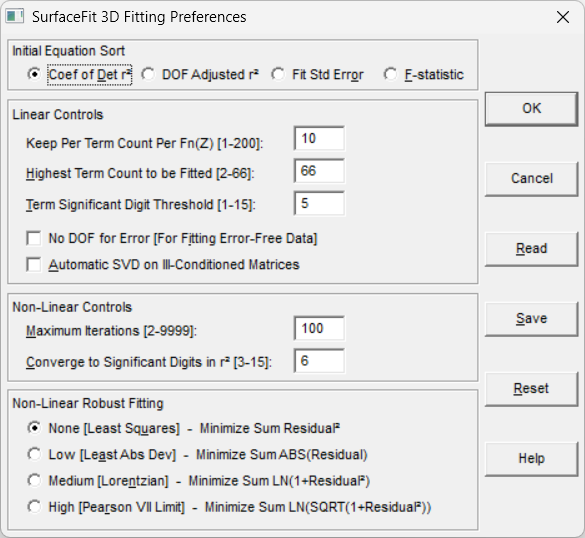
The Surface-Fit Preferences option in the Process menu is used to specify the fitting controls which are used for all of TableCurve 3D's Surface-Fit options. You may choose the goodness of fit criteria initially used to sort the equations. Linear fitting controls include the number of equations to add to the equation list for each coefficient count and Z-transform, the term significance threshold, the maximum coefficient count permitted, an automated SVD matrix procedure, and disabling the degree of freedom normally assigned to the error. Non-linear controls include the maximum allowable number of iterations, the convergence precision, and the minimization criteria. You may save a custom fit configuration to disk for recall at any future time.
Sort Criterion
The Initial Equation Sort is the goodness of fit measure that is used to initially prepare the equation list. This can subsequently be changed in the Review. The DOF Adjusted r2 and Fit Std Error options are recommended for approximating functions and the F-statistic is recommended for selecting the best parametric function. The F-statistic is also a very effective way to have the best of the simpler equations appear near the top of the list.
Keep Count
This value determines how many of the best equations to add to the equation list. It is specified per term count and per Z-transform, assuring that the best equations for each coefficient count and for each Z-transform in the selective subset are added to the list. This value is set using the Keep Per Term Count Per Fn(Z) item. It can vary from 1 to 200. To assure that all XY polynomials are added to the list, this value should be set to at least 45. To assure all XY rationals are added, this count should be set to at least 68. It is not possible to add all Selective Subset equations. When all equations are fitted, the maximum Keep Per Term Count Per Fn(Z) of 200 will produce an equation list containing up to 4873 equations.
Linear Maximum Terms
To change the maximum terms permitted when fitting linear equations, use the Highest Term Count to be Fitted item. The default is 66, which permits all of TableCurve 3D's equations. You may set any value between 3 and 66.
Linear Term Significance
The default Term Significant Digit Threshold is 5. This means that a given term in a linear equation must make at least a 1e-5 (0.001%) contribution to the average Z value when evaluations are made at nine sampling points within the data range. A term significance of 5 will frequently discard an equation when one term is of minimal significance. You may set the term significance anywhere from 1 to 15. At a low value such as 2 (1e-2,1%), a considerable number of equations may be excluded. Although there is no direct correlation, you may wish to set the term significance at a value slightly above the number of significant figures in your data.
Disabling the Degree of Freedom for Error
The No DOF For Error option is used for fitting data that is known to contain essentially a zero error. An example would be fitting handbook data tabulated to a high degree of precision. TableCurve 3D normally reserves a degree of freedom for the error of fit. This means that it would not be possible to fit a five-point data set to a five coefficient equation. When this box is checked, TableCurve 3D permits the maximum coefficient count to be equal to the number of data points. If you use this option with relatively few data points, you may see a large number of perfect r²=1.0 equations. Such an r²=1.0 equation will go through every point, but this is no indication that the model is appropriate to the data.
Auto-SVD
The TableCurve 3D linear fitting is fully automated and uses a very fast Gaussian Elimination matrix procedure. The Automatic SVD on Ill-Conditioned Matrices option offers a degree of additional capability that may benefit the fitting of higher term count polynomials and rationals. The design matrix for these equations can sometimes be nearly singular, causing the Gaussian Elimination procedure to compute coefficients that have been badly corrupted by accumulated roundoff and truncation error. The Auto-SVD option adds an automatic detection procedure for each fitted linear equation. If the reciprocal condition number for the design matrix of a given equation is less than 5E-14, the program will also produce a Singular Value Decomposition fit. The SVD fit replaces the Gaussian Elimination fit only if SVD produces a smaller sum of squared residuals. The matrix solution procedure used for a given fit is shown just above the analysis of variance within the Numeric Summary of the Review. If the Auto-SVD option was active during the automated fitting, the reciprocal condition number for the design matrix will also be reported. Note that the Auto-SVD procedure increases the overall fitting time for linear equations.
Non-Linear Maximum Iterations
The default number of iterations for a non-linear equation is 100. You may use the Maximum Iterations item to set this value anywhere between 2 and 9999. There is seldom much to gain beyond 100 iterations unless you are working with a very complex model.
Non-Linear Convergence Precision
The default convergence precision is 6. This means that the r² coefficient of determination must be unchanging in the sixth decimal place for five consecutive iterations to signal convergence. You may use the Converge to Significant Digits in r² button to set this value anywhere between 3 and 15.
Non-Linear Minimization
In addition to standard least-squares minimization, TableCurve 3D's non-linear engine is capable of three different Robust Estimations. These minimizations are sometimes referred to as maximum likelihood or m-estimate fitting.
If your data span a large number of orders of magnitude in the Z variable and the low-valued Z points are not factoring into the fit, a Non-Linear Robust Fitting selection will remedy this problem. For non-linear fits, this may well be a superior solution to fitting the LN(Z) rather than Z or seeking to weight the data so that these low-valued Z points can factor into a least-squares solution.
The other instance where robust fitting is recommended is when it is known that there are significant outliers within the data. Robust estimation will minimize the impact of outliers.
Least-squares corresponds to a Gaussian maximum likelihood distribution of errors. All of the robust minimizations correspond with maximum likelihood probability distributions significantly less compact than the Gaussian. These wider tails mean that the errors associated with outliers are expected. When outliers are suspected or likely, the Lorentzian minimization is highly recommended. Although TableCurve 3D's Levenburg-Marquardt non-linear engine is used for all of these minimizations, you will generally find that a higher number of iterations will be required for a robust fit as compared to least squares.
Saving Fit Preferences
Use the Save item to save the current fit preferences to disk. The default file extension is [FTP]. These are binary files that can only be produced within the program. The current fit preferences are always saved automatically across sessions. You will want to save preferences to disk if you plan to regularly use more than one fit configuration in your work. Surface-Fit Preference files can be recalled at anytime using the Read item.
Reset
The Reset button restores TableCurve 3D's default surface-fit preferences.