Main Graph Animation Setup
The Animation Setup button in the Process toolbar, or the Animation Setup item in the View menu, open a procedure where the animation settings are configured for the main window graph. These settings are separate from the 3D Animation settings used in the various analysis procedures throughout the program.
 The Animation button in the Process toolbar, or the Animation item in the View menu, toggle the main graph animation on and off.
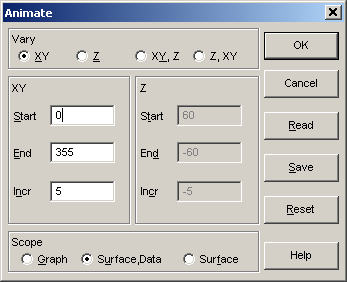
Animation Type
There are four animation options. You may animate only the XY view angle by selecting the XY option or only the Z view angle by selecting the Z option. You may also animate both view angles. The XY,Z selection will animate all of the Z angles while stepping through the XY angles. The Z,XY option will animate all of the XY angles while stepping through the Z angles.
Animation Angles
You must specify the Start, End, and Increment for type of angle being animated. Entries for the XY angle must be between 0 and 360 degrees and those for the Z angle must be between -90 and 90 degrees. The increment must be non-zero. All values must also be integers.
Animation Scope
The Graph option animates the graph exactly as it is being currently rendered. This means titles, labels, backplanes, and contours will be animated if present. The Surface,Data option animates only the 3D surface and the data points. The Surface option animates only the surface.
The Surface,Data and Surface options are identical for graphs that contain only a surface or only data points. In both instances, titles, labels, backplanes, and contours are removed. The animation thus consists of only the basic surface or data.
Saving and Reading Animation Files
The current animation specifications for the main graph are saved across sessions, so there is no need to save the animation configuration unless more than one configuration is needed. If you wish to regularly use more than one animation sequence within the program, you can Save the animation information to a disk file. Files are saved in binary with [.ANI] extensions. To read previously saved animation parameters, use the Read button.
Default
The Reset button restores a default where only the XY angle is animated at 30 degree increments.
Main Window Surface Graph
When OK is chosen, the animation is automatically started in the main window. If the exit is via the Cancel button, the animation is halted if it is currently set.
The animation will normally proceed as fast as the CPU and graphics processors can render the various graphs. The frames are drawn in memory first and displayed as a single bitmap. An upper limit of 10 frames per second is built into the animation.