Automated Fitting
In the Process menu, you may select from nine predefined built-in equation sets to fit:


 Surface-Fit Polynomial Equations
 Surface-Fit Rational Equations
 Surface-Fit Poly/Ratl Equations

 Surface-Fit Transition Functions
 You may choose to fit user-defined equations only with the Surface-Fit User Functions option.
 You may also choose to fit your own custom equation set with the Surface-Fit Custom Equation Set option.
 The current settings for the sort criteria and the various linear or non-linear fitting controls in the Surface-Fit Preferences option will be applied to the selected fit.
To assure that all XY polynomials are added to the list, the Keep Per Term Count Per Fn(Z) option in the Surface-Fit Preferences dialog should be set to at least 45. To assure all XY rationals are added, this count should be set to at least 68. In both cases, the Max Terms option should be set to 66, the coefficient maximum. It is impossible to add all Selective Subset equations.
Successfully fitted specialty linear equations (Chebyshev, Fourier, Cosine, Sigmoid series), and non-linear equations, including UDFs, are always added to the list, regardless of goodness of fit. Successfully fitted non-linear equations, including UDFs, are always added to the list, regardless of goodness of fit.
The processing of the TableCurve 3D data table is done in a highly automated single step. This may include up to 37,192 linear equations and up to 183 non-linear ones, fifteen of which may be user-defined. The automated fitting proceeds in the following sequence:
· 1. XY Polynomials
· 2. XY Rationals
· 3. Z Subset Equations
· 4. Ln(Z) Subset Equations
· 5. Inverse Z Subset Equations
· 6. Non-Linear Equations
· 7. User-Defined Functions.
Fit Progress
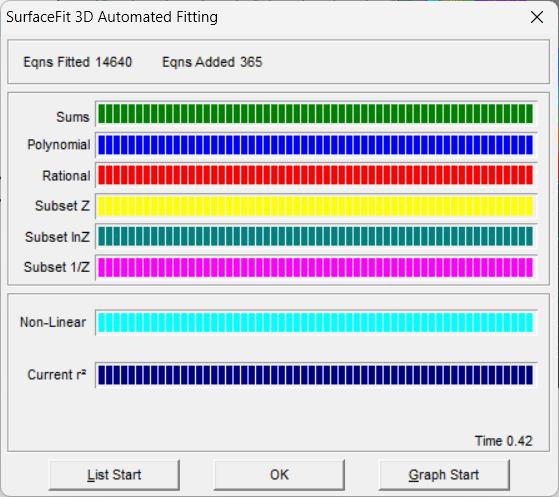
The first six bars reflect the progress of the linear fitting, the first displaying the progress in the computation of the various sums, the second in fitting the polynomials, the third in fitting the rationals, the fourth in fitting the Z selective subset equations, the fifth in fitting the logarithmic Z selective subset equations, and the sixth in fitting the inverse Z selective subset equations.
The last two bars reflect the progress of non-linear fitting, the first displaying the progress in the sequence of equations to be fitted and the second offers a graphical representation of the r² achieved. The r² bar is divided into five equal log sections.
If the Iteration Update box is checked, the r² bar and iteration and r² fields are updated with each iteration. Otherwise, the update occurs only when a fit is concluded. Note that this graphical update at each iteration can significantly slow the non-linear fitting. It is recommended that iteration update only be used when fitting is excruciatingly slow, and you wish to halt a number of non-promising non-linear fits prior to convergence.
Aborting Automated Fit
If you press the Cancel button during any portion of the automated fitting, the surface-fit is completely aborted.
Halting a Specific Non-Linear Fit
If Stop Current Fit is pressed during the non-linear portion of the fitting, the equation currently being fit is stopped at the current iteration and added to the list of fitted equations in this non-converged condition. For Windows XP, 2000, and NT, this halt will be immediately signaled and processed. In Windows 98 and ME, this stop may not be immediate.
Automatic Start of Review
If you do not respond to the message reporting the conclusion of the fit, the Review will be automatically started with the start option last used to begin the Review.
User-Initiated Background Fitting
Use the Fit in Background button to fit the TableCurve 3D equations in the background while working on another Windows task. You may also accomplish this by minimizing the main TableCurve 3D window. You may return to TableCurve 3D at anytime to inspect the progress of the fitting. When the fit is complete, an audible beep will signal the conclusion of the fit.
In a preemptive multitasking environment such as Windows XP, 2000, or NT, TableCurve 3D is able to do its fitting on a separate thread. This means you will not have any difficulty working with any other application while the TableCurve 3D fitting is underway. Under Windows 98 and ME, multitasking is limited and may be inadequate to offer smooth operation in the foreground task.