ASCII Export
The Save ASCII option in the File menu of the Surface-Fit Graph is used to write an ASCII file of generated surface-fit information. Three formats are offered varying from generated information with confidence and prediction intervals information to simple generated XYZ data in a columnar or matrix format.
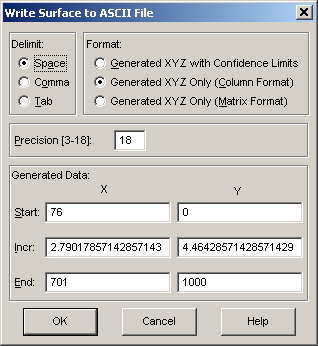
The Generated Information item writes generated information based upon X, Y values determined by the values in the Start, Incur, and End fields. This generated section will contain the predicted Z value as well as confidence and prediction intervals. The initial values in the X and Y generation will be based upon the current mesh counts, essentially offering the same vertex points as those in the TableCurve 3D surface graph. The confidence value used will be the value currently set in the Intervals menu.
The Generated XYZ Only (Column Format) option writes only the X,Y,Z information defining the surface in a three-column format.
The Generated XYZ Only (Matrix Format) writes the X values to the first row and the Y values to the first column. The Z-values are written into the matrix.
You may choose either Space, Comma, or Tab delimiters.
You may also set the Precision from 3 to 18 significant figures.
Note that it is also possible to generate a columnar XYZ ASCII file from the Surface-Fit graph's Evaluation option. XYZ ASCII files generated in the Evaluation write the XYZ data in columnar format with 17 digits of precision and space delimiters. The initial default values for the generation in the Evaluation will produce 100 points, not the actual mesh of the surface-fit graph as is done in this option. If you need to generate XYZ data based upon X and Y data values contained within a file, you must use the Evaluation option.