Enter Calculation
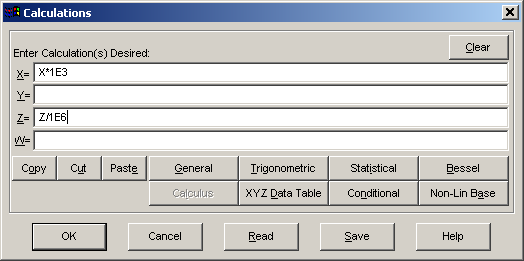
The Enter Calculation option in the Calculate menu is order for data transforms. A calculation consists of an X= expression, a Y=expression, a Z= expression, and a W= expression. Only one expression need be present in a calculation. You may enter any numeric calculation. All of the functions and constants available within TableCurve 3D can be accessed via a special Function Insert help. The X=, Y=, Z=, and W= prefixes are automatically supplied. When entering a calculation with multiple cross references to X, Y, and Z, bear in mind that the X calculation will be applied first, then the Y, then the Z, and finally the weight calculation.
Calculation Types
A calculation can be used to change the existing variable. As examples, the expression X=X*2.54 converts X-values in inches to centimeters and the expression Y=(4/3)*PI*Y^3 converts Y-values representing a radius to a volume. A calculation can also be used to calculate one variable based upon another. As examples, the expression Z=Z+1.232+2.323*X+3.3433*Y increments the original Z variable by the value of a function of X,Y. The expression W=1/Z assigns weights equal to the inverse of the Z-values.
Copy, Cut, Paste
Use these buttons to paste in expressions from the clipboard, or to modify the text across the various fields.
Read
Calculations that have been saved to disk are read by using the Read button. It is a good idea to save a calculation that will likely be used on future data sets. Calculation files are binary files with.CLC extensions. They can be created only within the program.
Save
The calculation active at the close of any given session is not automatically saved across sessions. You must explicitly save a calculation to disk using the Save button in order to have it available in a future session. Calculation files have.CLC extensions.
Validation
The calculation will be validated when you exit the Calculation entry screen. If there is an error in any of the expressions, an error message will report a specific parser or math error and you will be shown where within the expression the evaluation failed. The cursor will also be placed at this position. Note that a calculation must be defined at the Xmean, Ymean, and/or Zmean of the data table or at values of 1.0 if the data table is empty. Calculations are compiled for a very rapid processing with large data sets.
Option to Apply
You will be given an option to immediately apply the calculation you have entered to the current data table.
 It is in this Apply Calculation step that the calculation object is added or updated in the TableCurve 3D explorer.