AI Model Selection Guidance
Applies to: Studio (Claude Code and Codex CLI). In TableCurve 2D and TableCurve 3D the window offers only Copy for ChatGPT / Claude.ai.
AI Model Selection Guidance
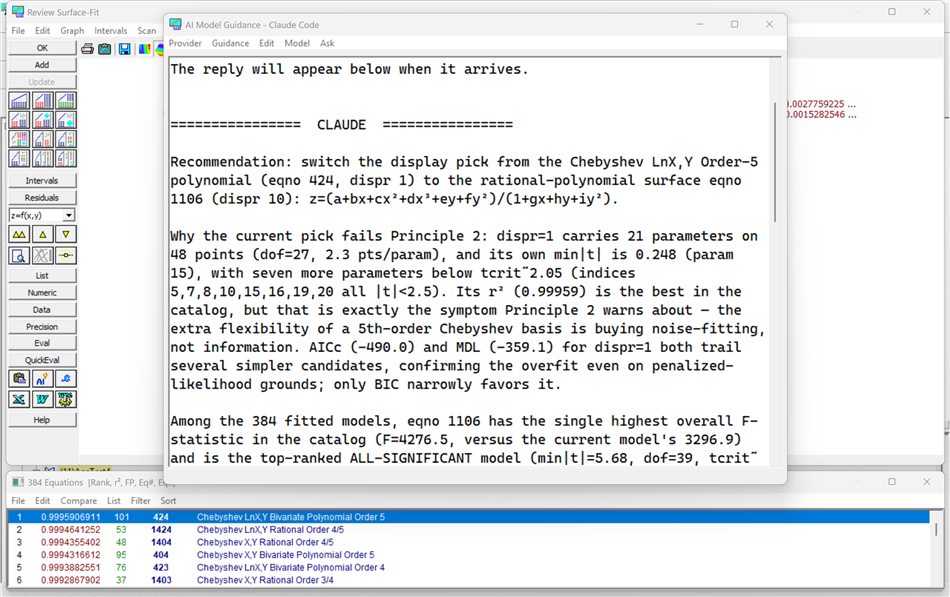
AI Model Guidance puts a scientific advisor beside the Review. From the Review of a curve fit or a surface fit, press the AI Guidance button on the toolbar. A window opens over the Review. From it you ask which of the fitted models to choose and why, and the advisor answers in the window from everything the Review knows: every fitted model with its statistics, and the data itself. Its recommendation selects that model in the Review.
The advice is not generic. The guidance the advisor follows was written for TableCurve, from the statistical doctrine behind the program: parsimony judged by the F-statistic, no insignificant parameters, theoretical models before approximating ones, prediction statistics before rē. You can read that guidance, tune it, and extend it; see The guidance you own below.
Two further kinds of request go beyond selection: the advisor can search for models the catalogue does not contain, and it can design and fit a predictive linear model from basis functions. Both are described in AI User-Defined Model Discovery [JUMP].
What you need
The advisor runs through an AI command-line tool installed on your computer and signed in to your own account. TableCurve does not include either tool, does not store your credentials, and does not send your data anywhere itself; the tool you chose does, under your account.
• Claude Code (Anthropic), the default provider. Install it from Anthropic's Claude Code page, run claude once to sign in, and TableCurve finds it on the PATH. Claude Code is the only provider that can use TableCurve's fitting engine while it works, which the discovery asks require.
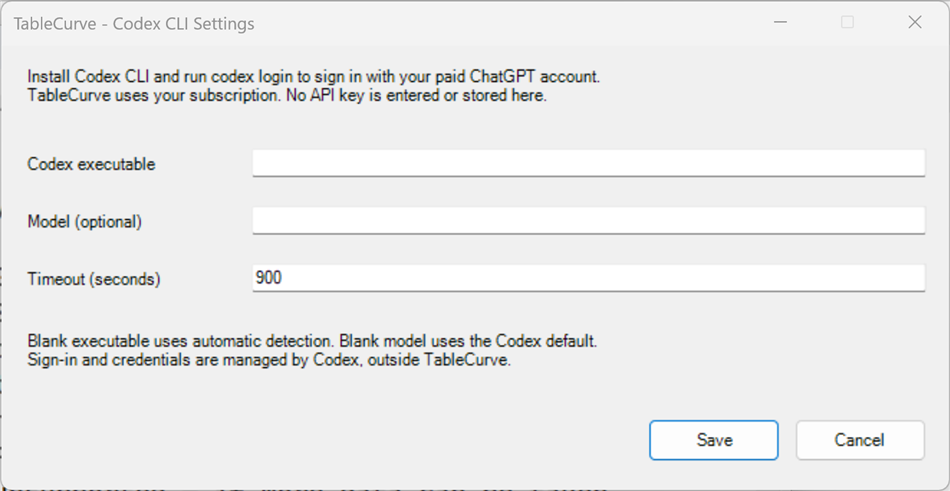
• Codex CLI (OpenAI). Install Codex CLI, run codex login and sign in with a paid ChatGPT plan (Plus, Pro, Team, Business, Enterprise or Edu). API keys are not accepted. If TableCurve cannot find codex.exe, point to it in Provider | Codex CLI Settings.
• No installation at all: Ask | Copy for ChatGPT / Claude.ai (Clipboard) assembles the whole request — the guidance, the evidence and the data — as one text on the clipboard. Paste it into a claude.ai or ChatGPT conversation and read the recommendation there. This is the route available in the 2D and 3D editions.
Choose the provider in the Provider menu. The choice is kept for the session. The window's caption names the provider in use.
The window
The window is one large text area with a menu bar. The text area is a conversation: the opening help text, then whatever you type, then each reply under a banner (CLAUDE or CODEX CLI). Every further Ask sends the whole window, so your earlier questions and the earlier replies are always in front of the advisor. You can edit the text freely before asking again, and Edit | Font changes the reading font (kept for the session). The window's size and position are remembered.
A progress bar runs along the bottom while a request is in flight. You can keep using the Review while you wait, but do not close this window or the Review: a closed window leaves the request running and its reply unread.
This is a window rather than a dialog so that it can stay open beside the Review while the advisor works, keep the conversation live across several asks, and host the GLM Review when a model is handed over.
Asking for a model selection
Ask | Built-In Model Selection requests a recommendation from among the models the Review already fitted. Choose the guidance that matches your problem:
• Parametric Model Selection — the data represent a mechanism: a peak, a transition, a kinetic decay or growth, or a composite of these. The advisor classifies the data's character itself, then applies the parametric doctrine: the F-test on added shape parameters, every parameter significant, roughly ten points per parameter, theoretical models preferred and a clear distinction between a refuted model and one the data cannot resolve.
• Approximating Function — you need a smooth, accurate description for interpolation, derivatives or integration, and no mechanism is claimed. Here BIC or MDL decide, behaviour between the points is part of the fit, and extrapolation is ruled out.
• Custom Guidance — a guidance document of your own (see The guidance you own).
The reply names a model and the reasons, and ends with a line @PICK eqno=n. TableCurve reads that line and selects the model in the Review. If the advisor needs fuller detail on some candidates it ends with @REQUEST_DETAIL and a list of equations; the next Ask carries that detail automatically.
Ask | Ask Selected Provider (window text) sends exactly what is in the window — your own question, or the conversation so far with a new question added at the end. Use it to challenge a recommendation, to ask about one model in particular, or to ask anything else about the fit.
Overview or Detailed
Guidance | Overview asks for a short reply in plain language for a working scientist without a statistical background: which model and why, two or three numbers at most, no jargon. Detailed (the default) asks for the full quantitative chain of evidence at professional depth. Switching depth in the middle of a conversation does not discard anything: a note is appended and the next reply answers at the new depth.
What the advisor sees
Before every Ask, TableCurve writes three files into your work folder %USERPROFILE%\TC9Claude: the evidence (every fitted model with its statistics, in a text format designed for the advisor to read), the data (x, y, and for surfaces z, with weights and the active flag), and the prompt (the window text and a short generated preamble naming the files, the current selection and the reply contract). The reply comes back as response.md in the same folder.
For model selection the advisor's permissions are read-only: it reads the files TableCurve wrote and replies. It has no command shell and cannot run programs. The wider permissions the discovery asks grant are described in AI User-Defined Model Discovery [JUMP].
The guidance you own
The doctrine the advisor follows lives in three plain-text documents in C:\TableCurve\AI: GUIDANCE_PARAMETRIC.md, GUIDANCE_APPROX.md and GUIDANCE_GLM.md. Guidance | View/Edit Guidance loads one into the window; read it, change it, extend it, and Save Guidance writes it back. Your edits shape every future analysis. Each document ends in a Learned additions section: in the discovery asks you can tell the advisor to "distil what you learned for future guidance" and it appends dated bullets there. Reset Guidance to Default restores the document as shipped. Save Guidance As makes a new document, and Custom Guidance in the Ask menu uses any document you choose.
Further files beside the program are for the advisor, not for you: the parser reference and the parser dictionary, which list every function name TableCurve's expression language accepts, with the Maple and Mathematica equivalents, and the fitting intelligence notes the discovery asks read. They are generated from or written for the program itself and are refreshed automatically; do not edit them.
The templates (Guidance | Assemble ... Prompt (legacy), Open Template, View/Edit Raw Template, Save Template As) are the earlier form of the same idea: a prompt as prose with @TOKENS@ that TableCurve fills in from the current fit. They remain for users who built their own; the guidance documents supersede them.
The providers
Claude Code is the default and the full-featured provider: model selection, both discovery asks, the engine tools, and the GLM Review hand-off. It runs headless in the background and needs no attention while it works.
Codex CLI runs the same guidance through OpenAI's Codex under your ChatGPT subscription. It supports Built-In Model Selection and the untested form of User-Defined Model Discovery; GLM discovery requires Claude Code. Provider | Codex CLI Settings sets the executable (blank for automatic detection), an optional model and the timeout. Codex keeps one conversation across your asks in this Review; New Codex Conversation starts afresh. Ask | Cancel Codex Request stops a request in flight. If a request fails, the reason is written into the window in place of a reply.
Files on your computer
• %USERPROFILE%\TC9Claude\ — the work folder: evidence, data, prompt and reply of the current Review, and the Codex session file.
• C:\TableCurve\AI\ — your guidance documents and the parser reference.
• C:\TableCurve\AI\Models\ — everything the discovery asks build (see the companion topic).
Acknowledgement
The scientific guidance, the evidence format, the model-selection and model-discovery procedures, and the engine tools behind this window were developed jointly by the author of TableCurve and Claude (Anthropic) over the course of 2026, from the author's decades of curve-fitting practice and Claude's analysis of the TableCurve fitting engine. They are part of TableCurve 9 and are the property of its publisher. The Codex CLI provider option runs this same guidance through OpenAI's Codex; it contributes no guidance of its own. Claude Code and Codex CLI are products of Anthropic and OpenAI respectively, installed and licensed by the user; TableCurve does not include or resell them.